
Scattered feedback across email threads, Slack messages, and spreadsheets costs marketing teams more than just time. It costs campaign quality. When your content review workflow for video lacks structure, approvals stall, revisions multiply, and stakeholders lose confidence in the process. Marketing and communications professionals today produce more video than ever, yet many teams still rely on review methods built for documents and static assets. This article gives you a practical, video-specific framework to fix that. You will learn how to set up the right roles and tools, execute a multi-stage approval process, avoid the most common pitfalls, and measure whether your new workflow is actually working.
Table of Contents
- Key Takeaways
- What your content review workflow video needs first
- How to execute the review process step by step
- Common pitfalls in video content approval
- How to measure your workflow’s effectiveness
- My take on where video review workflows actually break down
- How Kickervideo supports your video review process
- FAQ
Key Takeaways
| Point | Details |
|---|---|
| Define roles before you start | Assign content creators, approvers, and subject-matter experts before any video enters the review queue. |
| Use timestamped feedback | Tie every comment to a specific moment in the video to eliminate vague notes that cause rework. |
| Build stage-gated approvals | Multi-step approval processes with one designated approver per stage keep review cycles moving without creating bottlenecks. |
| Run AI as a first-pass filter | Use AI compliance alerts to flag issues before human reviewers touch the content, reducing errors and review time. |
| Measure cycle time and revisions | Track approval completion rates and revision rounds to verify that your workflow is improving over time. |
What your content review workflow video needs first
Before a single frame gets reviewed, you need three things in place: the right people, the right tools, and a clear timeline. Skipping this setup phase is what turns a two-day review into a two-week delay.
Define your stakeholder roles
Every video content approval process involves at least three types of contributors.
- Content creators: The producers, editors, or agency partners who build the video and submit it for review.
- Approvers: Stakeholders with sign-off authority, such as a brand manager, legal reviewer, or department lead.
- Subject-matter experts: People consulted for accuracy, such as a product specialist or compliance officer, who provide feedback but may not hold final approval authority.
A streamlined content review process depends on defining these roles clearly before the workflow begins, including who owns each approval stage and who is notified versus who must act.
Choose tools built for video
Document review tools were not designed for video. You need a platform that supports timestamped comments, version management, and role-based access. Tools with native video interfaces allow approvers to click a specific frame and leave a note attached to that exact moment, which makes revision instructions far less ambiguous.
Embedded video review tools inside project management platforms eliminate the context switching between where content lives and where it gets reviewed. That context switching is a direct cause of metadata loss and version confusion.
| Tool Feature | Why It Matters |
|---|---|
| Timestamped comments | Links feedback to exact moments, reducing guesswork in revisions |
| Version management | Tracks all drafts and prevents approvers from reviewing outdated files |
| Role-based access | Controls who can view, comment, or approve at each stage |
| AI compliance alerts | Flags sensitive content before human review begins |
Pro Tip: Set a response deadline for each approver before submitting the video. A two-business-day rule per review stage prevents submissions from sitting unactioned in inboxes.
How to execute the review process step by step
A well-structured content review workflow for video follows a predictable sequence. Deviating from that sequence is where most teams introduce delays.
-
Upload and tag the video properly. Before submitting, add metadata including project name, campaign, version number, and intended audience. Clean metadata prevents version confusion later and helps approvers locate files quickly.
-
Submit the video for approval. Once submitted, the video should enter a “Pending Approval” status and become visible only to the owner and designated administrators. This prevents premature distribution of unapproved content.
-
Route the video through multi-step approval stages. Configuring multi-step approval processes with designated approvers at each stage ensures content is reviewed thoroughly before it reaches a wider audience. Each step should have a clear pass or fail rule.
-
Collect and consolidate feedback. Approvers should leave comments tied to specific timecodes. Reviewers can also consult AI-driven compliance alerts that pinpoint exact timeline locations of flagged content, which reduces guesswork and focuses attention on real issues.
-
Approve or reject with clear documentation. If the video is rejected, approvers should include written comments explaining what must change. Vague rejections like “needs work” send creators back without direction and guarantee another round of confusion.
-
Revise and resubmit. The creator addresses the flagged items, updates the version number, and resubmits. The platform should allow both versions to coexist so approvers can compare them side by side before signing off.
-
Run a final comparison before sign-off. Version comparison before sign-off confirms that every piece of feedback was addressed and that no new issues were introduced during revision.
Pro Tip: Requiring only one approver per step to approve before the workflow advances makes multi-approver processes scalable. It balances accountability with speed and prevents the workflow from stalling while waiting for consensus.
Using AI in your content editing workflow

AI content analysis works best as a triage layer. Run it before human review begins to surface potential brand compliance issues, sensitive data, or flagged language. Then require human verification as the final judgment call. AI compliance alerts reduce review time and the rate of human error, but they are not a substitute for experienced reviewers. Think of AI as the first reader, not the last.
Common pitfalls in video content approval
Even well-intentioned teams run into predictable problems. Knowing these pitfalls in advance lets you design around them.
-
Vague feedback without timestamps. Comments like “the intro feels slow” or “fix the color” give editors no actionable direction. Tying all feedback to specific timecodes is a non-negotiable part of video review best practices.
-
Context switching between disconnected tools. When your content lives in one place, feedback arrives in another, and approvals happen in a third system, information gets lost. Unified storage and embedded review interfaces prevent file shuffling and metadata loss, which are two of the most common causes of review inefficiency.
-
Too many approvers with no clear owner. Approval by committee is approval by nobody. When ten people have sign-off authority and nobody has priority, timelines collapse. Assign one accountable approver per stage and treat others as consultants who provide input but do not block the workflow.
-
Version confusion. Sending video files via email or cloud storage links without a version control system means approvers may be reviewing the wrong draft. Your review platform must enforce version tracking automatically.
-
Skipping the sign-off record. Many teams finalize a video without any documented confirmation that every reviewer approved. This creates legal and compliance exposure. Build a formal sign-off step into the last stage of every workflow.
“Effective video reviewers distinguish between blocking issues that must be fixed before the video can move forward and polish items that are nice to have but not blockers. Mixing these two categories together creates unnecessary revision cycles.”
Pro Tip: Use a structured website review workflow as a model for your video process. Many of the same principles around role clarity, feedback consolidation, and version tracking transfer directly.
How to measure your workflow’s effectiveness
Building the workflow is step one. Verifying that it works is step two. These are the metrics that tell you whether your content review workflow video process is actually improving over time.
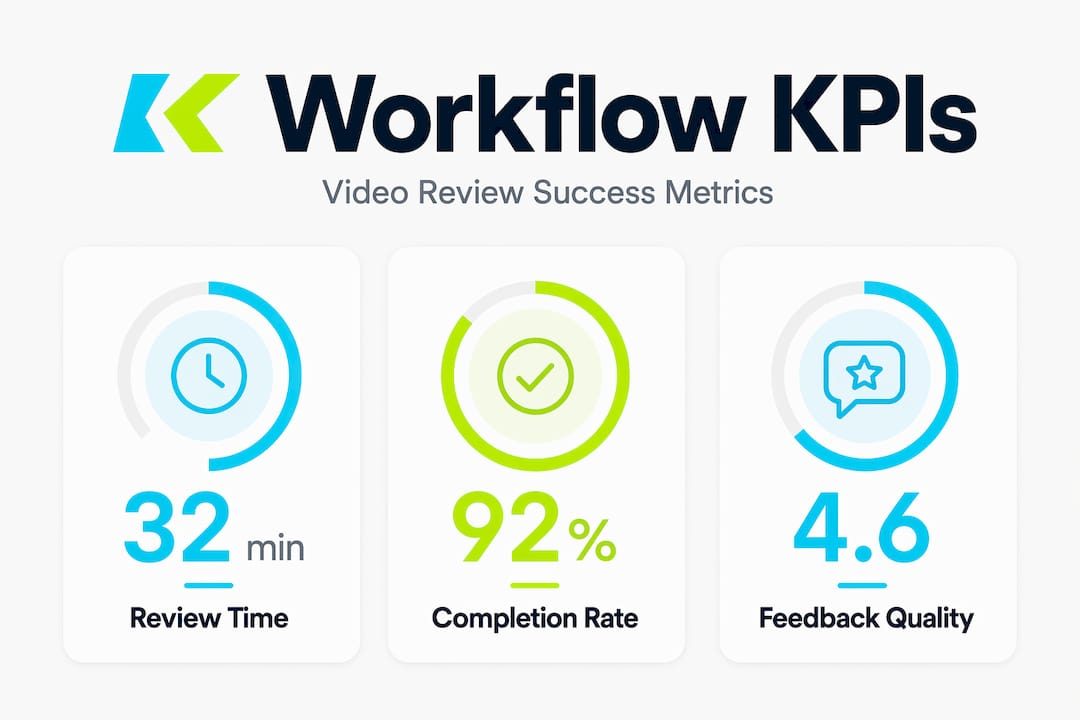
| Metric | What It Tells You |
|---|---|
| Average review cycle time | How long it takes from submission to final approval per video |
| Number of revision rounds | How many times a video is rejected before approval |
| Approval completion rate | Percentage of approvers who respond within the set deadline |
| Time to market | How quickly approved videos reach their intended audience |
| Feedback specificity rate | Whether comments include timecodes and clear action items |
Beyond individual metrics, watch for broader patterns. Advertising teams spend up to 70% of their time managing files and feedback rather than creating. If your workflow is working, that ratio should shift. Creators spend more time producing and less time chasing approvals or interpreting unclear notes.
You should also track version control compliance. If your team regularly submits files without proper version numbering or skips comparison steps before sign-off, your workflow documentation needs reinforcement through training, not just better tools.
- Set a monthly review cadence to audit workflow metrics and identify where cycles are getting stuck.
- Use dashboard visibility features in your review platform so stakeholders can see the current status of any video without needing to ask.
- Reward teams that consistently meet review deadlines. Accountability goes both ways.
A well-designed B2B video production workflow incorporates these metrics directly into the production cycle so that approval data feeds back into how future projects are scoped and scheduled.
My take on where video review workflows actually break down
After 18 years producing B2B video at Kickervideo, I’ve worked inside dozens of marketing team review processes. And the problem I see most consistently is not a tool problem. It is a design problem.
Most teams bolt a video review layer onto a workflow that was designed for something else entirely. They use a project management system built for software development, or a feedback tool designed for static design files, and then wonder why video reviews feel painful. The underlying system was never meant to handle a 90-second video with 14 comments spread across a three-minute runtime.
What I’ve learned is that the single highest-leverage decision a marketing team can make is choosing a video-first review tool instead of adapting a generic one. When the platform is built around video natively, timestamp feedback feels natural rather than forced, version comparison is a standard feature rather than a workaround, and AI compliance flags are integrated rather than bolted on.
I’ve also seen multi-approver workflows collapse under their own weight. The fix is not fewer stakeholders. It is clearer ownership. When each approval stage has exactly one person who holds the key, the workflow moves. When five people share that responsibility, it stops.
My strongest advice: treat your content review workflow video process as a product, not a procedure. Design it deliberately. Test it. Measure it. Revise it. The teams that do this consistently produce better content faster, and their stakeholders trust the output more because they were part of a clear, accountable process.
— Kicker
How Kickervideo supports your video review process
At Kickervideo, we have spent 18 years building video production workflows that work for marketing and communications teams with real deadlines and multiple stakeholders. We do not just deliver a finished video file and disappear. Our production process includes structured multi-step approval stages, consolidated feedback integration, and version management built into every project from day one.
If your current content approval process feels like a negotiation rather than a system, we can help you fix that. Our team designs review workflows alongside the video itself, so your stakeholders always know what to expect, when to act, and how their input shapes the final product. Explore how our B2B video production workflow can bring structure, speed, and clarity to your next campaign. We would be glad to walk you through what that looks like for your specific team.
FAQ
What is a content review workflow for video?
A content review workflow for video is a structured process that governs how a video is submitted, reviewed, and approved before release. It defines roles, stages, feedback methods, and sign-off requirements to keep the process consistent and accountable.
How do timestamped comments improve video review?
Timestamped comments tie feedback to exact moments in the video, which eliminates vague notes and gives editors specific, location-based direction. This practice reduces revision rounds and improves the overall quality of feedback during the content approval process.
How many approvers should each review stage have?
Each approval stage should have one designated approver who holds sign-off authority for that step. Requiring only one approver per step keeps multi-step workflows moving and prevents delays caused by waiting for group consensus.
Where does AI fit in a video content approval process?
AI works best as a first-pass filter that flags compliance issues, sensitive content, or brand violations before human reviewers begin their work. Human verification should always be the final step, as AI analysis supports but does not replace experienced editorial judgment.
How do you measure whether a video review workflow is working?
Track average review cycle time, number of revision rounds per video, and approval completion rates against set deadlines. If these numbers decrease over time, your workflow is improving. If they stay flat, examine whether role clarity or feedback quality are the underlying issues.